Configure the Microsoft Teams SIP Gateway URL
Admin must configure the Microsoft SIP Gateway URL for SIP Gateway ↔ Device Manager connectivity.
|
1.
|
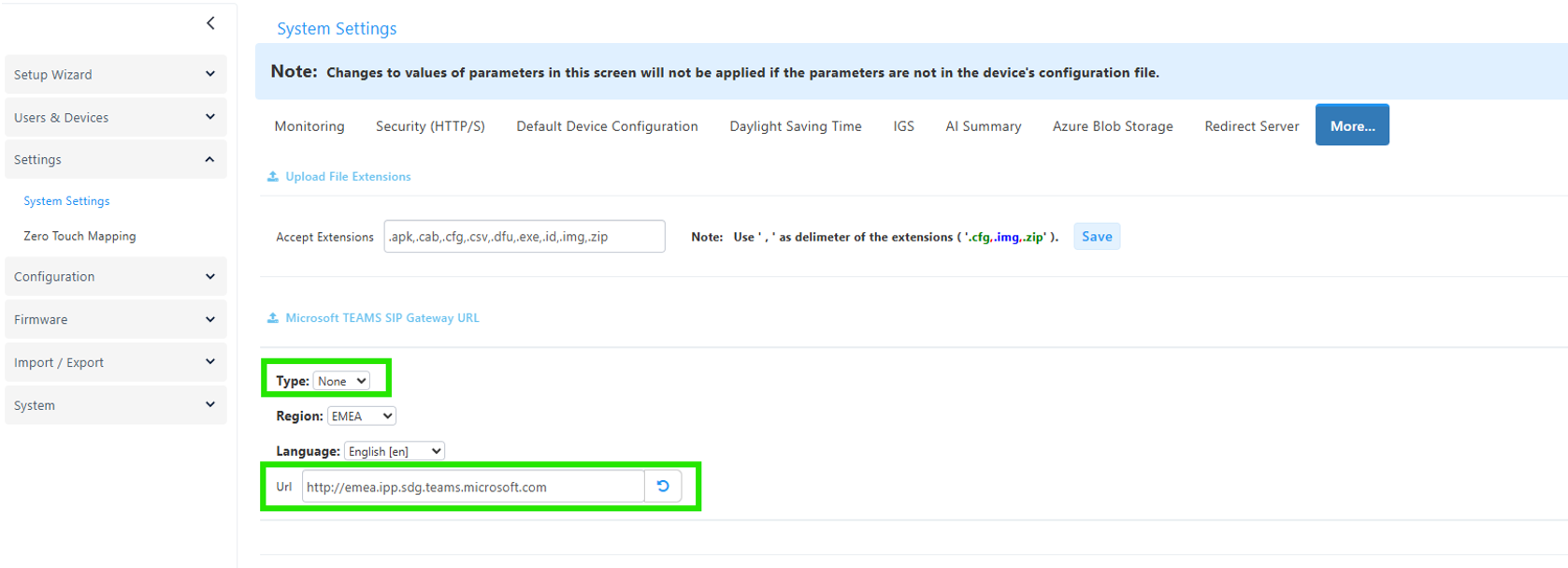
In Device Manager, open the System Settings page (Setup > Settings > System Settings) and then click the More... tab. |
|
2.
|
Under the section 'Microsoft Teams SIP Gateway URL' shown in the figure above, select the ‘Type’ from the drop-down: None or GCC-H. |
|
3.
|
Select the 'Region' from the drop-down. Select either: |
|
●
|
EMEA - the Microsoft SIP Gateway's URL http://emea.ipp.sdg.teams.microsoft.com is automatically displayed |
|
●
|
Americas - the Microsoft SIP Gateway's URL http://noam.ipp.sdg.teams.microsoft.com is automatically displayed |
|
●
|
APAC - the Microsoft SIP Gateway's URL http://apac.ipp.sdg.teams.microsoft.com is automatically displayed |
|
4.
|
Select the 'Language' from the drop-down; the URL is automatically adjusted accordingly. |
4. If needed (for example, to route the call via a specific appliance), modify the URL.
Note: If the URL is modified, the 'Type' field automatically reverts to None if it was set to GCC-H.
|
5.
|
Click the Save all Settings button at the bottom right of the page (not shown in the preceding figure). |
For detailed instructions on how to set up the URL, click the Help button.
